Point of sale in TallyPrime
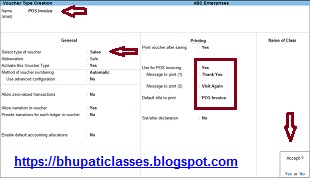
Point of sale in TallyPrime Point of sale in TallyPrime पोस्ट में हम जानेंगे कि Point of sale (POS) क्या है। Point of sale के advantages क्या हैं, POS invoice को टैली प्राइम में रिकॉर्ड कैसे करते हैं और payment के multiple mode में POS invoice को कैसे रिकॉर्ड करते हैं। Point of sale एक बिलिंग प्रक्रिया है। रिटेल शॉप में use होने वाले अलग अलग POS है जैसे cash register, card reader, bar-code scanner etc. POS invoice को single या multiple payment modes में रिकॉर्ड किया जा सकता है। टैली प्राइम में POS को प्रिन्ट कर सकते हैं। रिपोर्ट में POS के लेनदेन की list देख सकते हैं। टैली प्राइम में configure में POS को activate करना होता है। Point of sale के advantage - Sale को calculate करने में मदद मिलती है। Cash को manage करने में मदद मिलती है। Inventory को manage करने में मदद मिलती है। Bar-code scan करने में मदद मिलती है। Inventory और sales database की query को लचीला और सरल तरीका प्रदान करने में मदद मिलती है। Product movement को track करने में मदद मिलती है। Sale date और time को track करने और...
